Sunday, February 8, 2009

Deferred Lighting

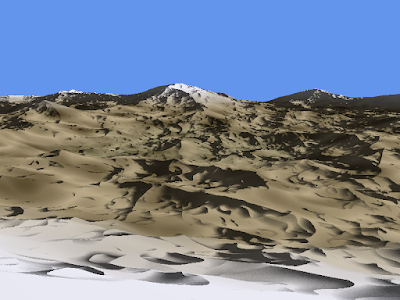
This weekend I implemented a lighting system like the one I talked about in my last two blog posts. I'm calling it deferred lighting because it doesn't do any lighting calculation until I have render targets for the scene. I have one render pass that has two targets: one containing the diffuse color of the scene, and the other containing the world position of each pixel. In a second render pass, I calculate the normal of each pixel by sampling it's neighboring pixel world positions. I then simply do a standard lighting calculation using the normal and the diffuse color of the scene.

It also has much better performance compared to the brute force 32 noise calculations method. At low altitudes I was getting 16fps with the noise method and 33fps with the deferred method. At high altitudes I was getting 12fps and 30fps, respectively. As you can see, I was getting at least double the framerate all the time.

Now for some pretty pictures. They are not much different from my previous lighting pictures, the important thing is that they are being rendered much faster now. I also fixed a slight bug I had in the previous lighting that made the light direction the same for every side of the planet (there was no dark side). There are some strange vertical lines that are appearing which you can see in some of the screenshots below. I'm not sure why they are there, but I will continue to investigate them.


In the last picture you can see the detailed designs that are being generated for the terrain itself. Just to show a difference between the lit vs diffuse renderings, here is the diffuse texture alone for the last picture.

Thursday, February 5, 2009

Per Pixel Normal Calculation

Sorry, still no actual code or pretty pictures!

I just wanted to write up a quick note related to my second topic in my previous post. I did some Googling to see if any other people have implemented a similar system and indeed some people have. In fact I found an article by Microsoft that describes exactly what I was talking about.

http://msdn.microsoft.com/en-us/library/cc308054(VS.85).aspx


In the article, they are creating procedural materials dynamically, so they have to calculate normals dynamically as well.

From the article:
"One solution is to run the shader multiple times and compute the difference in height at each sample point. If we calculated the height one pixel to the right of the currently rasterized pixel and one pixel above the currently rasterized pixel, we could compute tangent and bitangent vectors to the central pixel. Doing a cross product on these would give us the normal for that point."

What I found funny is how they start talking about the ddX and ddY functions in HLSL but in the end they still use the render target + second pass method.

"The solution that this sample uses by default is to render the perturbed heights of the objects in the scene into an off-screen render target. That render target is then read back in on another pass. For each pixel on the screen, its right and top neighbors are sampled. Tangent and bitangent vectors are created from the neighbors to the central pixel. A cross product between these will give the normal."

I now feel very confident about this method of doing things and I will proceed to implement lighting in this manner. I will probably branch off of my existing planet codebase so I can easily compare the differences between the brute-force noise calculation vs the "deferred" style.

Tuesday, February 3, 2009

Hello 2009!

I just realized that I never wrote an entry for January. It's the first month that I have not had an update since I started this dev blog. To be honest, I didn't have much to report. I haven't really written any code but I have been thinking about a lot.

At first I was thinking about physics. I thought it would be nice to actually have collision detection with my terrain and possibly throw balls around or maybe even drive a car. However there was a big problem with this. How do I detect collision with a mesh that is deformed entirely on the GPU? Obviously I would have to have some way of sending the physics data to the GPU, do the collision detection there, and then somehow pass the resultant data back to the CPU.

Getting the data to the GPU is the easy part, I think. If I only use bounding spheres for all of the objects, then I can simply pass one normal Color texture to the GPU containing the position of each sphere in the RGB and the radius of the sphere in the Alpha. It may even be possible to set a constant memory buffer (ie array) with the data, which would be even easier.

Once I have this data, I can run through each object in the vertex shader to see if it collides with the current vertex. The problem I ran into then is I don't know how to get the data back to the CPU. I would obviously want to write the data to a render target. Unfortunately, the collision data is in the vertex shader. Pixel shaders cannot index into memory in XNA/DX9/SM3.0. [In DX10/SM4.0 they can index into constant memory, in DX11/SM5.0 both the vertex and pixel shaders can read and write to dynamic resources.] I have no idea how I would pass the data from the vertex shader to the pixel shader.

That means I must somehow do the collision detection in the pixel shader. However, this means that I will be doing the checks for every object, for every pixel. That will be massive overkill. I couldn't come up with a good solution, so I pretty much gave up on physics for now. It should be a cinch in DirectX 11 and Shader Model 5.0!

The next thing I was thinking about was mainly efficiencies. Currently I am calculating the normal in the pixel shader by doing 32 noise calculations per pixel. This is quite a strain on the GPU. I was reading an article about deferred rendering and I had a thought. If I only output the height of each pixel to a render target, then I could have another pass that reads the neighboring pixels in the render target into order to calculate the normal. This means it would one pass that does 8 noise calculations per pixel and then a second pass that does 4 texture lookups per pixel. I imagine that would be a much faster way of doing things.

I have yet to actually implement anything though. So everything here is just speculation. Sorry for no pretty pictures. I will try to get something worth showing off sometime soon.

Monday, December 22, 2008

Starfields & Nebulas

Instead of focusing on craters (which I implied I was going to do last time), I decided to look into generating starfields and distant (ie 2D) nebulas.

I started on simple starfields and I had a working solution in less than an hour by simply drawing star sprites in random positions.

This yields the following result:


Next, in order to make the stars more interesting, I looked into implementing nebula clouds. I knew that some summation of Perlin Noise would be the best solution. So, I decided to implement a Perlin Noise function in C#. I have a really fast implementation in HLSL, but I wanted the full power of breakpoints and variable watches. I ended up using a standard fBm summation with an exponential filter applied to it.

This helped to produce this nebula cloud image:


I still need to blend these two results together and construct them into a decent cubemap.

World of Warcraft + 360 Controller

All of that work done on the starfields and nebulas was done a couple weeks ago. My co-workers recently pressured me into playing World of Warcraft again. (About 6 months ago, I got up to level 18, and then quit.) As I was playing I kept thinking about how bad the controls were. I was moving my hands all over the keyboard to use all of my skills. It was fine for just grinding along and completing quests, but grouping and duels I always performed horribly. I desparately wanted to play with a game controller, however World of Warcraft didn't support them. There were a couple of applications that other people had written to allow gamepads, but I didn't care for them either. One was very ackward and built up macro commands that you had to then "submit" by pulling the right trigger. Another one seemed decent, but it had a subscription fee of $20 a year.

I decided that if I wanted something done right, I had to do it myself. So, I threw together a quick XNA application that read the 360 controller input. It would then use the Win32 function SendInput to place keyboard and mouse input events into the Windows input queue. I mapped out all of the controls and I was then able to play World of Warcraft using a 360 controller! I can target enemies, target allies, use all 12 skills on the current action bar, switch action bars, loot corpses, and even move the camera with full analog control using the 360 controller! It has completely changed the game for me and I even won my first duel last night.

I have now taken the app and added in mappings for Call of Duty 4 for my brother. I'm planning on converting the project to be more generalized so that the input mapping can be defined in XML and easily changed without recompiling.

Thursday, December 4, 2008

Lighting Revisited (AKA I'm Back!)

So, after almost 3 months of being sidetracked with various other projects I came up with, I finally decided to come back to C# and XNA with welcome arms.

And I have come back in a big way, in my opinion. After discussing it with one of my friends, I decided that it would be best to procedurally generate a moon instead of a planet. This greatly simplifies many things; no atmosphere, no fog, no water, no vegetation, etc. However, this meant that I needed to figure out how to properly do two things: generate craters and have realistic lighting.

You may recall that I had a previous blog entry about my attempts with realistic lighting. [http://recreationstudios.blogspot.com/2008/07/do-you-see-light.html] In the end, I determined that it would be too difficult to do now, and easy to do in the future once I had geometry shader support. So, I had settled with simple spherical lighting across the entire planet.

So, it took me quite a bit of effort to even start looking at alternative ways to render realistic lighting. In the past I was trying to calculate the other two vertices of the triangle in the vertex shader. It was with a great facepalm that I realized that what I was trying to find was the tangent of the surface and then I could use that to adjust the spherical normal. Well, as you may remember from your math classes, a tangent is calculated by taking the derivative of the original function. So, I looked into quite a few articles about how to find the derivative of a Perlin Noise function.

This article was very informative, but I wasn't quite sure on what speeds would be on the GPU:
http://rgba.scenesp.org/iq/computer/articles/morenoise/morenoise.htm

Finally, I found an article by Ken Perlin himself that shows how to approximate the derivative:
http://http.developer.nvidia.com/GPUGems/gpugems_ch05.html (Section 5.6)

With this little nugget of knowlege I went into my shader and wrote a function to do exactly that.

float3 NoiseDerivative(float3 position, float e)
{
//calculate the height values using Perlin Noise
float F0 = ridgedmf(position*noiseScale, 8);
float Fx = ridgedmf(float3(position.x+e, position.y, position.z)*noiseScale, 8);
float Fy = ridgedmf(float3(position.x, position.y+e, position.z)*noiseScale, 8);
float Fz = ridgedmf(float3(position.x, position.y, position.z+e)*noiseScale, 8);
float3 dF = float3(Fx-F0, Fy-F0, Fz-F0) / e;

//calculate the actual normal
return normalize(position - dF);
}

Then I simply added a call to this function in my pixel shader:
input.Normal = NoiseDerivative(input.Normal, 0.000001);

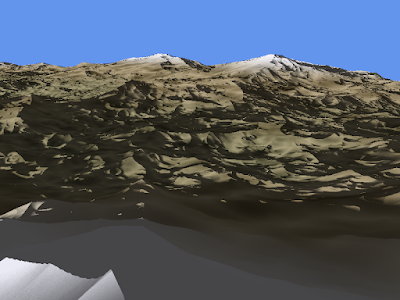
Lo and behold, it worked!

Check out the pics:

Friday, November 7, 2008

Sidetracked

Wow, it has been awhile and I haven't really had time to work on my graphics projects. I have been really busy at work. When I do finally make it home, I usually get sidetracked with other things. I finally got to level 60 in Mass Effect. I am over halfway through the excellent novel Prey by Michael Crichton (I can't believe he's dead now). I have also been piecing together ideas for my own novel (I've always wanted to write a novel).

In terms of the DirectX 10 work, I did manage to get multiple render targets working. However, I got sidetracked by a bright idea I came up with involving using "strokes" generated in the geometry shader to do some NPR post processing. I was having a hell of a time trying to get multiple vertex buffers working. As I was investigating though, I found out that it wouldn't work anyway because the buffer size is limited to 16-bits (65,536 vertices). I needed more than that ... alot more. It would be a rather long explanation to explain why, so I'll just say that I was trying to essentially use the vertex shader as a pixel shader.

XNA 3.0 is out now, and I'm really surprised that I have not yet downloaded it. It sounds like they added in some nice features though (new Media classes, ClickOnce deployment, etc.).

I am really missing C#, so I may just go back to XNA and just wait for it (or some other C# graphics library) to get Geometry Shader support.

I was also reading about some of the features that are going to be in C# 4.0, and I am really excited. They are finally adding in optional parameters. Plus they are adding a dynamic type, which could prove useful in some cases.

Tuesday, October 7, 2008

It's getting close

I've been continuing my work in DirectX 10, and it has been relatively slow progress, but progress nonetheless. I managed to render the simple character model that comes with the DirectX SDK using the first pass of my pencil shader. The first pass applies 6 different pencil textures based upon how lit that part of the model is. It is currently using the given texture coordinates of the model, so it doesn't look as good as it potentially could. That's an improvement for another time though.

I have been busy working on getting the second pass of the pencil shader working. It's pretty much just a Sobel filter that is applied to the normal map of the scene. In order to get the Sobel filter working though, I had to first figure out how to do post-processing image filters in DirectX 10. Obviously the first step was to render a full-screen textured quad. In XNA, I "cheated" and just used a SpriteBatch. It's not the most efficient way, but it allowed for the fastest development.

There ARE sprites in DX10, but I figured I might as well do it the "proper" way this time. So, I set up my own vertex format (with Position and Texure Coords), created my own vertex buffer (with the 4 vertices positioned in clipspace), and my own index buffer. I then wrote a simple shader that simply passed the vertices through the vertex shader, and applied the texture in the pixel shader. I fired up the app for the first time and Vista completely froze! Ctrl-Alt-Del didn't work, the mouse didn't move, nothing. So I shut it down and restarted and I got the Blue Screen of Death! I booted back into Safe mode and it said that my video card driver had gotten screwed up. I was able to boot back into Windows regularly the next time without changing anything.

I set a breakpoint in my code and stepped through the Update/Render loop about a dozen times without any errors, so I just let it run free again. The exact same problems occurred again, thus causing a reboot. I had no idea what I was doing wrong to screw up my computer, so I looked at several of the DX tutorials line by line. I realized that I had forgotten to tell the video card what my vertex input layout was. I added in the 3 lines of code to do it, and bam, everything worked! So I now have full screen textured quads working in DX10. An added bonus is since I positioned the vertices in clipspace, then it works on any resolution without requiring any updates or changes, plus there are no matrix multiplications that are needed to be done.

The next task I have to work on is to get mutiple render targets working in DX10. I need this because as I mentioned earlier, my goal is to render a normal map of the scene, and then pass that normal map into the Sobel filter shader.