Boy have things been busy for me! I'm now going to do something rare and dive into more detail into my personal life, so feel free to skip this entire post if you want development related information.
Since my last post, I've moved twice and changed jobs. In August and September 2012, my previous employer's parent company had tasked us with the simultaneous development of four games in order to present them at a big expo in Las Vegas. For a team of 12 people, this was quite a task, but we were successful and were all quite happy to see the games on the show floor in October 2012.
We returned home in high spirits and full of new ideas to implement. There was a meeting scheduled with our parent company just days after we got back. We all thought it would be congratulatory and a discussion of future projects. Instead, they announced that our entire studio was being laid off and we had three hours to gather our things and leave. Being the first time I've ever been laid off, it was quite shocking to me.
I immediately began searching everywhere for a new job: San Francisco, Sacramento, Salt Lake City, Montreal, Orlando, etc. I ended up accepting a position in Reno for a small-ish casino game developer. I'm basically the resident "Unity expert" and I help guide the best practices in it's use (reduce memory usage, improve artist workflow, etc). I also help plan and develop Unity tools and template projects as well.
I decided to move to be closer to the new office. Plus, I figured it was finally time for me to move out of an apartment into a house. That involved not only moving all of my stuff, but also getting much more furniture to fill the house. One of my major intentions of moving into a house was to get a puppy, but it turned out I was misinformed and my landlord didn't allow dogs. So, I had to move again to a house that really did allow dogs. I now have a Chocolate Labradoodle puppy named Fenrir.
I've also been occupied with developing a relationship with a fantastic woman, but that's all I'll say about that, since that is a little too personal.
So, although life has been quite busy the past several months, it has also been relatively good!
I've been tinkering around with Unity 4.x as well as testing out various web IDEs for doing WebGL development. The 2D workflow in Unity 4.3 looks fantastic and I want to play around with it more.
Oh, and I also got braces on my teeth since my last post. So I'm one of those weird adults with a brace-face.
I'll probably be looking into actually updating my assets on the Unity Asset Store sometime soon.
Thursday, December 12, 2013


Monday, July 23, 2012
Unity GPU Noise 1.3 Released!
As you can tell from the title, I've been able to release several updates for GPU Noise since my last post.
I borrowed a MacBook from one of my friends and installed Unity on it. That allowed me to quickly port all of the noise functions to GLSL and ensure they all worked on Mac. However, I was still having issues with the noise functions on my Android devices. Unity on Android is actually incredibly unhelpful in this regard. It doesn't report any errors or anything. The shader simply fails and runs a fallback shader.
I decided to create a WebGL test page using the same GLSL code since WebGL uses OpenGL ES 2.0 (the same as mobile devices). I quickly found out (and remembered, as I've posted about this in the past) that OpenGL ES doesn't allow variables in for loop expressions. It must be a constant expression (i.e. loop a fixed number of times). I made a mobile port of my GLSL noise that forced all summation functions (fBm, Turbulence, and Ridged) to loop 8 times. Even though this changed allowed the code to work properly in WebGL, it was still not working on Android.
I then took a different direction and tried writing a straight Java test app for Android. I found out there is a major bug where Android won't report the shader compilation errors. It just gives you an empty string. Not very helpful. I managed to get the shader to compile, but I ran into more OpenGL issues due to mismatched vertex attributes. I cast aside the example in frustration.
Someone who purchased a copy of GPU Noise let me know that Xcode on Mac actually reports shader compilation errors, so I begged a coworker of mine who has a Mac, Unity, and an iOS developer license to give it a try. As soon as he deployed it to his iPad, we saw the error that has been eluding me this entire time. There was a "Uniform precision mismatch" with some of my variables. I did some investigation and found out that vertex shaders in GLSL default to high precision while pixel shaders default to medium. I hard coded my vertex shaders to use medium precision and now almost all of my functions work on Android! I say almost because all of the Voronoi 3D Displacement functions seem to peg out the CPU (as before) and cause the device to freeze and crash. I think they're just too resource intensive to use on current mobile devices (they work on Windows and Mac just fine). At least the 2D Animated Voronoi functions all work on Android.
Related to an earlier post, I still need to figure out why a Tegra 3 sucks so much. It's not just speed, but also the rendering quality. Here are a few comparisons for example.


I borrowed a MacBook from one of my friends and installed Unity on it. That allowed me to quickly port all of the noise functions to GLSL and ensure they all worked on Mac. However, I was still having issues with the noise functions on my Android devices. Unity on Android is actually incredibly unhelpful in this regard. It doesn't report any errors or anything. The shader simply fails and runs a fallback shader.
I decided to create a WebGL test page using the same GLSL code since WebGL uses OpenGL ES 2.0 (the same as mobile devices). I quickly found out (and remembered, as I've posted about this in the past) that OpenGL ES doesn't allow variables in for loop expressions. It must be a constant expression (i.e. loop a fixed number of times). I made a mobile port of my GLSL noise that forced all summation functions (fBm, Turbulence, and Ridged) to loop 8 times. Even though this changed allowed the code to work properly in WebGL, it was still not working on Android.
I then took a different direction and tried writing a straight Java test app for Android. I found out there is a major bug where Android won't report the shader compilation errors. It just gives you an empty string. Not very helpful. I managed to get the shader to compile, but I ran into more OpenGL issues due to mismatched vertex attributes. I cast aside the example in frustration.
Someone who purchased a copy of GPU Noise let me know that Xcode on Mac actually reports shader compilation errors, so I begged a coworker of mine who has a Mac, Unity, and an iOS developer license to give it a try. As soon as he deployed it to his iPad, we saw the error that has been eluding me this entire time. There was a "Uniform precision mismatch" with some of my variables. I did some investigation and found out that vertex shaders in GLSL default to high precision while pixel shaders default to medium. I hard coded my vertex shaders to use medium precision and now almost all of my functions work on Android! I say almost because all of the Voronoi 3D Displacement functions seem to peg out the CPU (as before) and cause the device to freeze and crash. I think they're just too resource intensive to use on current mobile devices (they work on Windows and Mac just fine). At least the 2D Animated Voronoi functions all work on Android.
Related to an earlier post, I still need to figure out why a Tegra 3 sucks so much. It's not just speed, but also the rendering quality. Here are a few comparisons for example.

EVO 3D

Transformer Prime

EVO 3D

Transformer Prime
As you can see, the Transformer Prime looks horrendous! I'm not sure what's causing such terrible visual artifacts. Hopefully someone online has an idea.
Until next time...
Thursday, June 28, 2012
Unity GPU Noise 1.0 Released!
GPU Noise has finally been released on the Unity Asset Store! Check it out here!
As you can tell from all of the past posts, this has been a long road. It's still not perfect though. It works great on Windows, but the reviewers let me know that it has some issues on Macs. I borrowed my friend's Mac for a little bit and found out that the issue is most likely due to the cross compiler that Unity uses to convert Cg code into GLSL. (It was creating multiple variables with the same name.)
I decided to directly port the Cg code to GLSL, but it's been a rough process since the Windows version of Unity doesn't compile GLSL at all. This means that you don't get any errors or feedback at all to let you know if you wrote some code incorrectly. I had to write code, deploy to my Android phone, see if it works, and repeat. Over and over and over. Painful. I'm thinking about picking up a cheap Mac (gasp!) just to have something that can compile GLSL code and give me feedback. I'm hoping porting to GLSL fixes the problems on Mac, but I have no way to know for certain until I actually do it.
As usual, I'll be tracking my progress here.
As you can tell from all of the past posts, this has been a long road. It's still not perfect though. It works great on Windows, but the reviewers let me know that it has some issues on Macs. I borrowed my friend's Mac for a little bit and found out that the issue is most likely due to the cross compiler that Unity uses to convert Cg code into GLSL. (It was creating multiple variables with the same name.)
I decided to directly port the Cg code to GLSL, but it's been a rough process since the Windows version of Unity doesn't compile GLSL at all. This means that you don't get any errors or feedback at all to let you know if you wrote some code incorrectly. I had to write code, deploy to my Android phone, see if it works, and repeat. Over and over and over. Painful. I'm thinking about picking up a cheap Mac (gasp!) just to have something that can compile GLSL code and give me feedback. I'm hoping porting to GLSL fixes the problems on Mac, but I have no way to know for certain until I actually do it.
As usual, I'll be tracking my progress here.
Friday, June 22, 2012
Unity GPU Noise (Part 5)
And somehow 9 months have passed...
To be honest, I had a lot going on in my life since my last post. My development laptop got stolen, my work laptop's hard drive failed, and other, more personal, things happened, which I won't get into. As a result of the theft, I lost some of my work. Not too much, just a week or two, but enough to make me unmotivated to return to my project and do the same work again.
About a week ago, I decided to finally dive back into it all. I installed the latest Unity on my desktop and dusted off my old USB flash drive with the old copy of GPU Noise on it. I decided to redo almost everything in the project to base it off of the texture-less implementations of noise in order to make it as easy and cross-platform as possible to implement in Unity (and hand off to other developers).
It was pretty smooth going, for the most part. Based on my prior experience, I knew what I was doing. The only big problem I ran into was trying to port mod from GLSL over to Cg. I first used fmod in Cg, but that made the results all messed up. I finally found this answer that explains the problem and how to fix it. Once I implemented my own mod function in the same manner as GLSL's, everything was fine again.
Regarding the Android front, I'm not sure if it was something that got fixed in the Cg compiler between Unity versions, but all of my noise functions seemed to run on Android, for the most part. The only issue I ran into is when I tried doing the 3D Voronoi displacement, the functions consumed too much processing and crashed the device. This is because the displacement example has to call the function twice, which is a lot of processing.
Another Android "issue" I had was the performance of my devices. I have an HTC EVO 3D and an ASUS Transformer Prime. My EVO got about 47 FPS running the simple Perlin displacement. I assumed the Transformer Prime would do better, but it only got 9 FPS. Apparently the Adreno 220 outperforms the Tegra 3. I ran some other benchmarks which came to the same conclusion. I even looked at the Unity SystemInfo objects on both devices and I was really surprised to see the that Transformer Prime only has 61 MB of video memory while the EVO 3D has 216 MB. I was greatly disappointed to see how poorly my Tegra 3 tablet performed. I'll continue to investigate the issue in order to see if there's something I can do to improve its performance.
Just tonight I finally submitted my GPU Noise project to the Unity Asset Store. If all goes well, it should be appearing on the store in a week or less. Here's hoping!
Check out the latest demo!
Until next time!
To be honest, I had a lot going on in my life since my last post. My development laptop got stolen, my work laptop's hard drive failed, and other, more personal, things happened, which I won't get into. As a result of the theft, I lost some of my work. Not too much, just a week or two, but enough to make me unmotivated to return to my project and do the same work again.
About a week ago, I decided to finally dive back into it all. I installed the latest Unity on my desktop and dusted off my old USB flash drive with the old copy of GPU Noise on it. I decided to redo almost everything in the project to base it off of the texture-less implementations of noise in order to make it as easy and cross-platform as possible to implement in Unity (and hand off to other developers).
It was pretty smooth going, for the most part. Based on my prior experience, I knew what I was doing. The only big problem I ran into was trying to port mod from GLSL over to Cg. I first used fmod in Cg, but that made the results all messed up. I finally found this answer that explains the problem and how to fix it. Once I implemented my own mod function in the same manner as GLSL's, everything was fine again.
Regarding the Android front, I'm not sure if it was something that got fixed in the Cg compiler between Unity versions, but all of my noise functions seemed to run on Android, for the most part. The only issue I ran into is when I tried doing the 3D Voronoi displacement, the functions consumed too much processing and crashed the device. This is because the displacement example has to call the function twice, which is a lot of processing.
Another Android "issue" I had was the performance of my devices. I have an HTC EVO 3D and an ASUS Transformer Prime. My EVO got about 47 FPS running the simple Perlin displacement. I assumed the Transformer Prime would do better, but it only got 9 FPS. Apparently the Adreno 220 outperforms the Tegra 3. I ran some other benchmarks which came to the same conclusion. I even looked at the Unity SystemInfo objects on both devices and I was really surprised to see the that Transformer Prime only has 61 MB of video memory while the EVO 3D has 216 MB. I was greatly disappointed to see how poorly my Tegra 3 tablet performed. I'll continue to investigate the issue in order to see if there's something I can do to improve its performance.
Just tonight I finally submitted my GPU Noise project to the Unity Asset Store. If all goes well, it should be appearing on the store in a week or less. Here's hoping!
Check out the latest demo!
Until next time!
Sunday, September 25, 2011
Unity GPU Noise (Part 4)
Well, I'm a stubborn individual, so I continued working on the Android version of GPU Noise. I have actually been successful and made a little progress. Not without encountering more issues, of course.
First, I must say that GLSL hates conditional branches (including for loops). The main reason why my example scene wasn't running on Android was because I used an if-else tree in my shader (previously a switch statement) to select the noise type based upon a variable that was set on the Material by the C# side. While this works perfectly fine on Windows and DirectX, it's not the case for Android. I had to separate each noise type into its own shader/material and then have logic on the C# side to select the correct Material.
This is where things start to get strange. The basic Perlin noise function worked fine (as well as Voronoi), but none of my summations (like fBm) worked. They are simply for loops that call the Perlin function repeatedly. For testing, instead of having it take a variable for the number of times to loop, I hard-coded it to 4 octaves. This didn't work either. However, if I manually unrolled the for loop to have the code repeated 4 times, it finally worked.
Now, a little aside about my implementation. In order to speed up the noise functions, I precompute some values and store them in various textures which the noise functions then sample from. I wanted the noise functions to be accessible in both a vertex shader and pixel shader, so I used the tex2Dlod function to sample the textures. This is because tex2Dlod is the only permitted function for sampling from a vertex shader. (Automatic mip-mapping doesn't work in a vertex shader, so the developer must specify the mip-map level to use.)
Thinking that using tex2Dlod was somehow causing my for loop problems, I decided to look into a different implementation. I found a GLSL implementation of Perlin noise that didn't use any arrays or texture lookups (amazing!), thus making it highly cross-platform. I promptly ported it over to Cg in Unity. I was dismayed to discover that it yielded really terrible looking visual artifacts. The problem was even worse when using any summation. I quickly made a test scene in WebGL to test the shader in its original GLSL. Here, as you can see, it all worked perfectly. Going back to the Cg port, I went over line by line to see where it was failing. I first tried replacing the optimized "hacks" he used in place of modulus. That didn't fix it. Then, I looked at his inverse square root function. If I replaced his function with a call to rsqrt, the artifacts disappeared!
Armed with a new implementation, I tried running my test scene on Android again. And again, my summations failed. I happened to discover that the summations only worked when given certain octaves (for loop counter). This is the strangest thing of all. If I gave it 1, it worked. If I gave it 2 through 8, it failed. If I gave it 9 or greater, it worked.
I must say, I'm entirely perplexed. I have all of my noise functions working on an Android device now, but only with certain ranges on the summations. Why doesn't it work with 4 octaves when it works with 10? Does anyone have any insight into this strange issue?
Thursday, September 15, 2011
Unity GPU Noise (Part 3)
As I mentioned previously, I had updated my GPU Noise to hopefully get it working on Macs. One of my friends tried the web player build on his Mac, and I was saddened to see that it still came out as a black, non-displaced sphere.
As I was investigating, I found the Shader.isSupported API which looked like it might be helpful. I noticed in the documentation, however, that it will return true if any of the Fallback shaders will work. In my noise shader, I had given it a fallback of "VertexLit", thus why only a flat, black sphere was rendered on the Mac. I didn't want the API to always return true (since VertexLit obviously was working), so I commented out the Fallback statement. Bad move! Not only did the web player fail to load on a Mac, it completely locked the entire OS requiring a reboot! Since my friend's Mac is a dual-boot with Windows 7 on it, I had him try it out on the Windows side. Everything worked perfectly!
In order to help me with debugging possible hardware issues, I wrote a simple little Unity web player that listed the hardware specs according to how Unity sees the machine. It's been pretty interesting and helpful. You can run it over here.
Using that app, I was able to see that the Mac only runs OpenGL 2.1! For comparison, when I forced my Windows build to run in OpenGL mode (using -force-opengl), it reported that it was running OpenGL 4.1. My hatred for Apple increases daily.
Deciding to switch gears for a bit, I started looking into deploying the GPU Noise on my EVO 3D to see how it ran. (No, I don't have a personal Android license for Unity yet, but I do have one from work. I;m not going to publish anything from it, just use it to test my stuff after work.) So, I got everything setup and sent my package over to my phone, where I was greeted with the "Powered by Unity" splashscreen. That was it; it never made it beyond that point. I hooked up logcat and added some debug lines to see what errors were occurring. That wasn't helpful at all. It showed Unity loading, timing out, and then reloading. My level file was never loaded, none of my scripts were ever executed. If I switched my Material to be something else (I used a particle material), it would load properly and run. So, it was an issue with my noise Material, but I have no idea what, due to the lack of errors.
As it stands now, I'm not quite sure how to proceed. Do I release this on the Unity Asset Store as it is now and put a disclaimer that it only works on Windows currently, or do I invest more time and effort to get it working on Mac/Android first? Opinions?
Monday, September 12, 2011
Procedural Primitives (Unity Asset Store)

It's based on the code I wrote to generate primitives in XNA. You can read about that code and download it on my old blog post here.
Basically, it allows you to create your own primitive 3D shapes (planes, cylinders, cones, and boxes) in Unity. Sure, Unity already has all of these as built-in primitives, but you can't change the resolution of these shapes at all. Plus, they provide no ability to create just the Mesh object and not a full GameObject. Procedural Primitives lets you pick the quality you want and gives you the option to create only the Mesh or the a full GameObject containing MeshFilter, MeshRenderer, and Collider components.
Procedural Primitives allows you to create the shapes either in the Unity Editor by way of a custom editor window, or you can call the methods in script.
To create them in the editor, you choose GameObject --> Create Other --> Procedural Primitive from the menu:

A new window will pop up that will allow you to tweak several parameters (depending upon the chosen shape) and then create a new primitive shape.

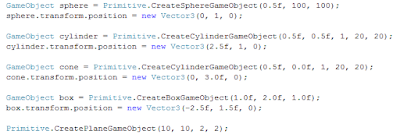
To create a new shape in script, you simply call one of the static methods on the Primitive class along with the desired parameters:

All money I get from the sales of Procedural Primitives will help fund my purchase of an Android license of Unity.
I'm currently preparing my noise package release. It should be coming out sometime in the next week.
Subscribe to:
Posts (Atom)