Wow, it has been awhile and I haven't really had time to work on my graphics projects. I have been really busy at work. When I do finally make it home, I usually get sidetracked with other things. I finally got to level 60 in Mass Effect. I am over halfway through the excellent novel Prey by Michael Crichton (I can't believe he's dead now). I have also been piecing together ideas for my own novel (I've always wanted to write a novel).
In terms of the DirectX 10 work, I did manage to get multiple render targets working. However, I got sidetracked by a bright idea I came up with involving using "strokes" generated in the geometry shader to do some NPR post processing. I was having a hell of a time trying to get multiple vertex buffers working. As I was investigating though, I found out that it wouldn't work anyway because the buffer size is limited to 16-bits (65,536 vertices). I needed more than that ... alot more. It would be a rather long explanation to explain why, so I'll just say that I was trying to essentially use the vertex shader as a pixel shader.
XNA 3.0 is out now, and I'm really surprised that I have not yet downloaded it. It sounds like they added in some nice features though (new Media classes, ClickOnce deployment, etc.).
I am really missing C#, so I may just go back to XNA and just wait for it (or some other C# graphics library) to get Geometry Shader support.
I was also reading about some of the features that are going to be in C# 4.0, and I am really excited. They are finally adding in optional parameters. Plus they are adding a dynamic type, which could prove useful in some cases.
Friday, November 7, 2008


Tuesday, October 7, 2008
It's getting close
I've been continuing my work in DirectX 10, and it has been relatively slow progress, but progress nonetheless. I managed to render the simple character model that comes with the DirectX SDK using the first pass of my pencil shader. The first pass applies 6 different pencil textures based upon how lit that part of the model is. It is currently using the given texture coordinates of the model, so it doesn't look as good as it potentially could. That's an improvement for another time though.
I have been busy working on getting the second pass of the pencil shader working. It's pretty much just a Sobel filter that is applied to the normal map of the scene. In order to get the Sobel filter working though, I had to first figure out how to do post-processing image filters in DirectX 10. Obviously the first step was to render a full-screen textured quad. In XNA, I "cheated" and just used a SpriteBatch. It's not the most efficient way, but it allowed for the fastest development.
There ARE sprites in DX10, but I figured I might as well do it the "proper" way this time. So, I set up my own vertex format (with Position and Texure Coords), created my own vertex buffer (with the 4 vertices positioned in clipspace), and my own index buffer. I then wrote a simple shader that simply passed the vertices through the vertex shader, and applied the texture in the pixel shader. I fired up the app for the first time and Vista completely froze! Ctrl-Alt-Del didn't work, the mouse didn't move, nothing. So I shut it down and restarted and I got the Blue Screen of Death! I booted back into Safe mode and it said that my video card driver had gotten screwed up. I was able to boot back into Windows regularly the next time without changing anything.
I set a breakpoint in my code and stepped through the Update/Render loop about a dozen times without any errors, so I just let it run free again. The exact same problems occurred again, thus causing a reboot. I had no idea what I was doing wrong to screw up my computer, so I looked at several of the DX tutorials line by line. I realized that I had forgotten to tell the video card what my vertex input layout was. I added in the 3 lines of code to do it, and bam, everything worked! So I now have full screen textured quads working in DX10. An added bonus is since I positioned the vertices in clipspace, then it works on any resolution without requiring any updates or changes, plus there are no matrix multiplications that are needed to be done.
The next task I have to work on is to get mutiple render targets working in DX10. I need this because as I mentioned earlier, my goal is to render a normal map of the scene, and then pass that normal map into the Sobel filter shader.
I have been busy working on getting the second pass of the pencil shader working. It's pretty much just a Sobel filter that is applied to the normal map of the scene. In order to get the Sobel filter working though, I had to first figure out how to do post-processing image filters in DirectX 10. Obviously the first step was to render a full-screen textured quad. In XNA, I "cheated" and just used a SpriteBatch. It's not the most efficient way, but it allowed for the fastest development.
There ARE sprites in DX10, but I figured I might as well do it the "proper" way this time. So, I set up my own vertex format (with Position and Texure Coords), created my own vertex buffer (with the 4 vertices positioned in clipspace), and my own index buffer. I then wrote a simple shader that simply passed the vertices through the vertex shader, and applied the texture in the pixel shader. I fired up the app for the first time and Vista completely froze! Ctrl-Alt-Del didn't work, the mouse didn't move, nothing. So I shut it down and restarted and I got the Blue Screen of Death! I booted back into Safe mode and it said that my video card driver had gotten screwed up. I was able to boot back into Windows regularly the next time without changing anything.
I set a breakpoint in my code and stepped through the Update/Render loop about a dozen times without any errors, so I just let it run free again. The exact same problems occurred again, thus causing a reboot. I had no idea what I was doing wrong to screw up my computer, so I looked at several of the DX tutorials line by line. I realized that I had forgotten to tell the video card what my vertex input layout was. I added in the 3 lines of code to do it, and bam, everything worked! So I now have full screen textured quads working in DX10. An added bonus is since I positioned the vertices in clipspace, then it works on any resolution without requiring any updates or changes, plus there are no matrix multiplications that are needed to be done.
The next task I have to work on is to get mutiple render targets working in DX10. I need this because as I mentioned earlier, my goal is to render a normal map of the scene, and then pass that normal map into the Sobel filter shader.
Friday, September 26, 2008
DirectX 10
I've decided to finally start dabbling with DirectX 10. The main reason behind it is that I want to work with Geometry Shaders. There is no official C# wrapper around DX10, but I did manage to find two third-party ones. One had not been updated since April 2006, so I threw that one out the window. The other, SlimDX, has been in very active development and a new version was just released this month. I downloaded it and played with some of the samples and was rather impressed. However, SlimDX also provides a wrapper around DX9 and it is very clear that that was the priority of the project. There are quite a few things missing from the DX10 wrapper that would have been very useful.
So, instead of fighting through a third-party C# wrapper, I figured I might as well go back to the straight C++ version. This has the advantage of having tons of official samples and tutorials from Microsoft. However, this has the major disadvantage that I have not worked in C++ directly for almost 4 years. It is rather rough going back to C++ from C#. There were so many helpful things built into C# that aided in rapid development. I mean, C++ doesn't even have a string type, you have to use char arrays. (Edit: I forgot that it does support strings, but you have to include the header for it first. Doh!) I feel like I'm stepping back into the dark ages! :-P
I'm hoping to have just the basic C++ code to draw a model using a shader, and then all of the rest of my work will be in HLSL. We shall see!
(Edit: I found a really helpful C++ tutorial for getting me back up to speed. http://www.cplusplus.com/doc/tutorial/ )
So, instead of fighting through a third-party C# wrapper, I figured I might as well go back to the straight C++ version. This has the advantage of having tons of official samples and tutorials from Microsoft. However, this has the major disadvantage that I have not worked in C++ directly for almost 4 years. It is rather rough going back to C++ from C#. There were so many helpful things built into C# that aided in rapid development. I mean, C++ doesn't even have a string type, you have to use char arrays. (Edit: I forgot that it does support strings, but you have to include the header for it first. Doh!) I feel like I'm stepping back into the dark ages! :-P
I'm hoping to have just the basic C++ code to draw a model using a shader, and then all of the rest of my work will be in HLSL. We shall see!
(Edit: I found a really helpful C++ tutorial for getting me back up to speed. http://www.cplusplus.com/doc/tutorial/ )
Sunday, September 14, 2008
Switching Gears
So I was chatting with one of my friends about what was up next on the todo list for my procedural planet. I explained that I was working on fog and that after that I would focus on water. He suggested that I get HDR and Depth of Field put in next. I then mentioned how I want to get Atmospheric Scattering in as well.
With all of these features laid out, the project seems rather daunting. That is easily several months worth of work right there. (I still do have a full time job!) I started thinking about how to make it easier, yet still make it stand out. I mean no matter how many awesome looking things I put in, I will never even come close to the level of Crysis. I am only one guy! So, I decided I should focus more on something that would be feasible for a team of one to accomplish in a lifetime.
Time for a personal history lesson!
Back when I first started fiddling around with XNA (over 2 years ago now), I also started looking into shaders for the first time. I have always been interested in Non-Photorealistic Rendering (cel shading, painterly rendering, hatching, etc), so I thought that might be a good subject to test with shaders. In my research, I came across a great paper about doing real-time pencil sketch rendering. http://cg.postech.ac.kr/research/pencil_rendering/
In January 2007, I began work on my own pencil shader. I actually started with 4 separate shaders that would require all models to be rendered 4 times. Fairly quickly I realised that I could speed things up greatly by having 1 shader with 4 passes. I tinkered around with it, and other things, for several months before I found out about using multiple render targets. Using this, I was able to get it down to 3 passes. Not long after that, I demoed the shader in a job interview and I actually got a job as an XNA Game Developer! That job lasted until the company got bought out by a larger company. Toward the end of my employment there, I started getting into procedural generatation, and that's how I came to have the procedural planet that I have today.
As you know, I have a new laptop now, and during the transfer of files from my old laptop, I saw my old pencil shader again. It had gone untouched since the day I demoed it in my job interview. Yesterday I finally decided to take all of the code and update it to XNA 2.0 and clean up what I could. I realized that I had learned quite a bit over the last year about both XNA and C#, so I was able to make the code much cleaner. Not only that, but I was also able to get the shader down to 2 passes! This gave me a 100fps speed boost. (On my GeForce 9800 GT, the 4 pass = 470fps, 3 pass = 480fps, 2 pass = 580fps.)
This has really given me a desire to work on NPR stuff again. So, currently my next goal is to have a procedural planet that is rendered using my pencil shader.
With all of these features laid out, the project seems rather daunting. That is easily several months worth of work right there. (I still do have a full time job!) I started thinking about how to make it easier, yet still make it stand out. I mean no matter how many awesome looking things I put in, I will never even come close to the level of Crysis. I am only one guy! So, I decided I should focus more on something that would be feasible for a team of one to accomplish in a lifetime.
Time for a personal history lesson!
Back when I first started fiddling around with XNA (over 2 years ago now), I also started looking into shaders for the first time. I have always been interested in Non-Photorealistic Rendering (cel shading, painterly rendering, hatching, etc), so I thought that might be a good subject to test with shaders. In my research, I came across a great paper about doing real-time pencil sketch rendering. http://cg.postech.ac.kr/research/pencil_rendering/
In January 2007, I began work on my own pencil shader. I actually started with 4 separate shaders that would require all models to be rendered 4 times. Fairly quickly I realised that I could speed things up greatly by having 1 shader with 4 passes. I tinkered around with it, and other things, for several months before I found out about using multiple render targets. Using this, I was able to get it down to 3 passes. Not long after that, I demoed the shader in a job interview and I actually got a job as an XNA Game Developer! That job lasted until the company got bought out by a larger company. Toward the end of my employment there, I started getting into procedural generatation, and that's how I came to have the procedural planet that I have today.
As you know, I have a new laptop now, and during the transfer of files from my old laptop, I saw my old pencil shader again. It had gone untouched since the day I demoed it in my job interview. Yesterday I finally decided to take all of the code and update it to XNA 2.0 and clean up what I could. I realized that I had learned quite a bit over the last year about both XNA and C#, so I was able to make the code much cleaner. Not only that, but I was also able to get the shader down to 2 passes! This gave me a 100fps speed boost. (On my GeForce 9800 GT, the 4 pass = 470fps, 3 pass = 480fps, 2 pass = 580fps.)
This has really given me a desire to work on NPR stuff again. So, currently my next goal is to have a procedural planet that is rendered using my pencil shader.
Tuesday, September 2, 2008
Procedural Texturing
Well I am now producing what in my opinion are decent procedural textures for the planetary terrain. They are generated per pixel every frame. This has the advantage of allowing infinite resolution as well as eliminating any texture coordinate warpings around a sphere, since the textures are actually 3D.
As I mentioned before, this does require a significant performance hit. I have managed to simplify the texture generation to the point of having reasonable framerates while maintaining decent texture quality. What I am doing is calculating 4 separate textures using 2 octaves of turbulence noise at different scales for each one. These 4 textures represent sand, grass, rock, and snow. They are then blended together based upon the terrain height to generate a final texture.
I am getting anywhere between 25-50 frames per second depending upon how many pixels of the terrain are taking up the viewport. The average for normal travel is 35 frames per second.
Here are some screenshots of the results.
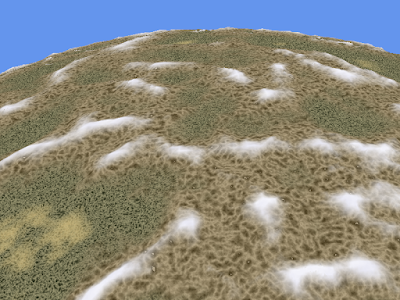
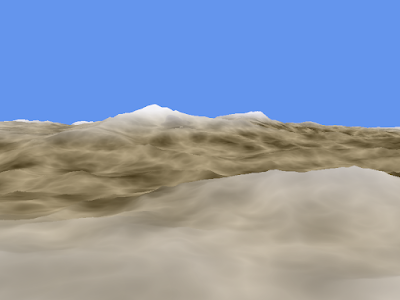
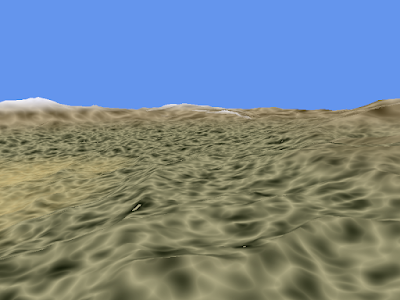
As I mentioned before, this does require a significant performance hit. I have managed to simplify the texture generation to the point of having reasonable framerates while maintaining decent texture quality. What I am doing is calculating 4 separate textures using 2 octaves of turbulence noise at different scales for each one. These 4 textures represent sand, grass, rock, and snow. They are then blended together based upon the terrain height to generate a final texture.
I am getting anywhere between 25-50 frames per second depending upon how many pixels of the terrain are taking up the viewport. The average for normal travel is 35 frames per second.
Here are some screenshots of the results.


Monday, September 1, 2008
New Laptop, New Opportunities
It's been awhile since I've written an update. As expected I got slightly side-tracked by Too Human, but what was an even worse offender was Mass Effect. I picked it up at a sale at Toys R Us, and I became addicted to it. I am currently working on my third playthrough of the game.
I finally received my new laptop 3 days ago. I haven't had much time to do programming on it because I had to first install all of my desired applications, transfer all of my files from my old laptop, and then prepare my old laptop for my sister.
I did manage to run a "benchmark" on the new laptop though. In the past, I wrote an XNA app that generates a texture using Perlin Noise in a pixel shader. This is usually a good evaluator of a GPU's performance. Here are some specs:
Generating 12 octaves of 1024x1024 3D fractional Brownian motion Perlin Noise:
8600 GT ~20 frames per second
9800 GT ~80 frames per second
Yep! My new laptop's GPU is 4 times faster than my desktop! Just to put a little perspective on it, these results mean that my new GPU was performing over 1 billion perlin noise calculations a second!
I also started fiddling around briefly with generating procedural textures for the planetary terrain. My idea was to use 4 different noise calculations per pixel and then blend the results together based on the planetary height of the pixel. As expected though, there was a severe penalty for doing a noise calculation per pixel. I never did get up to 4 calculations. Here are my initial findings, on my 9800 GT of course!
~120 fps using 4 existing textures
~40 fps using 1 8-octave ridged multifractal per pixel
~30 fps using 2 8-octave ridged multifractals per pixel
The performance hit is not linear though, so I expect that if I did 4 noise calcs, I would be getting about 20fps. However, that is on a 9800 GT, which is one of the best cards on the market now. Sure there are about half a dozen better cards, but how many people really have them?
I do have some ideas to potentially speed it up though. I could reduce the number of octaves, but then increase the scale. I could also try to make a fancy gradient so that I don't have to use as many different noise calcs.
Here are some screenshots showing different simple gradients using just 1 noise calc.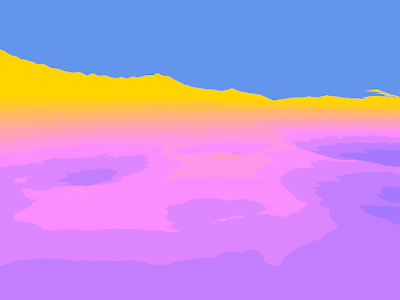

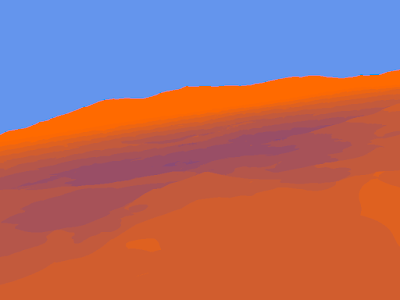
I finally received my new laptop 3 days ago. I haven't had much time to do programming on it because I had to first install all of my desired applications, transfer all of my files from my old laptop, and then prepare my old laptop for my sister.
I did manage to run a "benchmark" on the new laptop though. In the past, I wrote an XNA app that generates a texture using Perlin Noise in a pixel shader. This is usually a good evaluator of a GPU's performance. Here are some specs:
Generating 12 octaves of 1024x1024 3D fractional Brownian motion Perlin Noise:
8600 GT ~20 frames per second
9800 GT ~80 frames per second
Yep! My new laptop's GPU is 4 times faster than my desktop! Just to put a little perspective on it, these results mean that my new GPU was performing over 1 billion perlin noise calculations a second!
I also started fiddling around briefly with generating procedural textures for the planetary terrain. My idea was to use 4 different noise calculations per pixel and then blend the results together based on the planetary height of the pixel. As expected though, there was a severe penalty for doing a noise calculation per pixel. I never did get up to 4 calculations. Here are my initial findings, on my 9800 GT of course!
~120 fps using 4 existing textures
~40 fps using 1 8-octave ridged multifractal per pixel
~30 fps using 2 8-octave ridged multifractals per pixel
The performance hit is not linear though, so I expect that if I did 4 noise calcs, I would be getting about 20fps. However, that is on a 9800 GT, which is one of the best cards on the market now. Sure there are about half a dozen better cards, but how many people really have them?
I do have some ideas to potentially speed it up though. I could reduce the number of octaves, but then increase the scale. I could also try to make a fancy gradient so that I don't have to use as many different noise calcs.
Here are some screenshots showing different simple gradients using just 1 noise calc.


Sunday, August 17, 2008
Relaxing
I decided that since I had accomplished so much by pretty much working non-stop for almost a month, I was going to take a break for a bit. So, I have not worked on my procedural planet for this past week. Of course, I could never really break myself away from it, so I have been reading books and websites to research the next phase. I even put together an HLSL project to do some experimentation. So, don't worry, progress is still being made, just at a much slower rate now. I'm guessing I will start working on it again this week. After I get my new laptop (sometime after the 28th) I'm hoping to really pick up the pace again. Although, I do have a word of warning: I may get distracted with DirectX 10 and Geometry Shaders. We shall see. (Not to mention that Too Human comes out on Tuesday, Tales of Vesperia next week, Infinite Undiscovery the week after, and Spore the week after that! Too many good games coming out so soon.)
Until next time.
Until next time.
Subscribe to:
Posts (Atom)